
Drywall Estimating Software
Allpro Drywaller Details
 |
Allpro Drywaller was developed specifically for drywall contractors. Allpro Drywaller is a perfect fit for drywall contractors of all sizes. As long as your primary pricing is based on a square or lineal ft value, Allpro Drywaller is your Drywall software choice. Allpro Drywaller allows you to use only the features you choose. You can use Allpro Drywaller independently to manage your business or you can choose to integrate the software with QuickBooks. This software completely automates the estimating process and takes the guess work out of estimating drywall jobs. Measurements can be taken on the jobsite and entered directly on the jobsite or brought back to the office. The measurements can then be used to automatically create an estimate, based on the square footage or lineal feet. Once you are finished creating the estimate, you have the option to send that estimate directly to QuickBooks or manage your estimates directly with Allpro Drywaller. This allows you to create and manage estimates with Allpro Drywaller and also benefit from all the accounting features found in QuickBooks. Over four years went into developing this Drywall Contractor Software! Note: The features of Allpro Drywaller have been merged into Allpro Insulator, an advanced estimating software for sub-contractors. For up to date version information for Allpro Insulator, please visit www.allproinsulationsoftware.com.
|
Don't settle for a generic "general contractor" program!
Allpro Drywaller was developed specifically for Drywall Contractors!
Allpro Drywaller is also a great fit for professional painters!
Use Allpro Drywaller Independently
OR -
Integrate with QuickBooks
You choose which features to use!
Time is Money
- Literally Cut Your Administration Time In Half
- Eliminate Wasted Time by Entering Information Only Once
- Produce Drywall Estimates for Customers Right Away on the Job Site
- Faster and More Accurate Billing Process
- Easily Determine Who Owes You Money and How Much
- Manage Your Crews Schedule In One Convenient Place
Key Features
- Manage Customers and Jobs
- Create Drywall Estimates and Invoices
- Produce Drywall Estimates on the Job Site
- Merge Estimate Data with Your Contracts
- Synchronize Laptop with Office
- Does Not Require an Internet Connection
- Track Accounts Receivable
- Manage Estimate Pricing/Costing
- Provide Detailed Package Options
- Create Detailed Job Sheets
- Manage Job Expenses
- Track Employee Wages
- Manage Job Schedule
- Manage Tasks and Activities
- Print Over Thirty Reports
- Send Estimates to QuickBooks
- Remote Access Technical Support
Drywall Software Menu
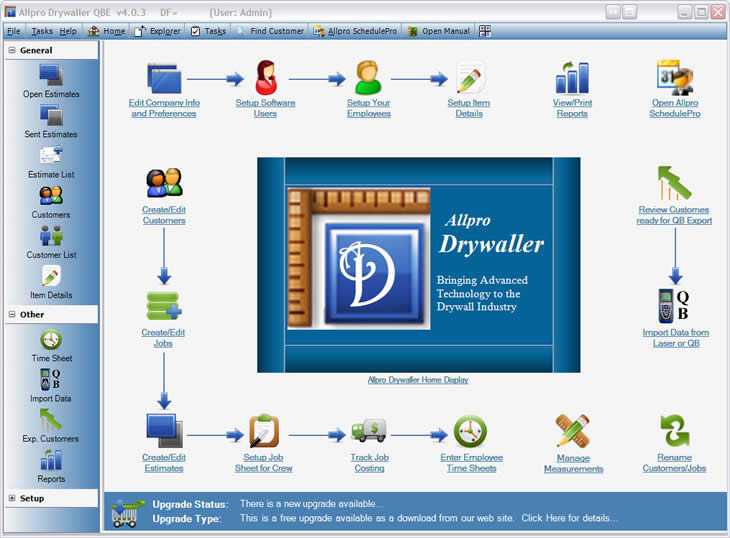
The screen shot below shows the main screen that is displayed when you open Allpro Drywaller. When you select an icon on the left side of the screen, that particular form is displayed in the main area of the form. This interface makes Allpro Drywaller very easy to navigate around. All of your options are displayed right in front of you.
The new Home Screen provides you with the proper workflow information as well as quick links to common tasks. This new Home Screen makes navigation extremely simple. We have done everything possible to make this drywall contractor software very easy to use. We realize that not everyone has a computer expert in the office. With the help of our manual and our telephone support, we truly believe anyone can learn this Drywall Estimating Software!
Two Editions To Choose From
Allpro Drywaller is available in two editions.
- Allpro Drywaller SAE (Stand Alone Edition)
- Allpro Drywaller QBE (QuickBooks Edition)
Both editions include the same basic features and functionality with the following exceptions:
- The Stand Alone Edition allows you to create estimates, manage all your customers, estimates, invoices, and receivables from directly within Allpro Drywaller.
- The QuickBooks Edition provides all the same functionality as the Stand Alone Edition plus QuickBooks integration. After you have completed the estimate, you will have the option to send the estimate to QuickBooks. You will then be able to harness all of the accounting benefits of QuickBooks without having to manually reenter the estimate. This edition also allows you to share all of your customer, job, and item data between Allpro Drywaller and QuickBooks.
System Requirements
In order to run Allpro Drywaller properly, your computer must meet the following minimum system requirements.
- Microsoft Windows XP, Vista, Windows 7, Windows 8 and 8.1
- A Personal Computer Using a 1GHz or Higher Processor
- 2GB of RAM (2048MB Recommended)
- Hard Drive With 500MB of Free Space
- 1024x768 or Higher Resolution Video
We highly encourage you to take the Allpro Drywaller Tour. This tour shows you each step from taking measurements with your laser to exporting your estimates to QuickBooks. Also feel free to call us if you have any questions regarding our Drywall software.
Click Here to view the web page tour.